Hi Friends!
In this post I’d like to explain a technique I call Trust Relay: an installed PWA that never clones Google’s login page. The user installs what looks like Google Drive, launches it as an app, and is then sent to the real accounts.google.com.
before starting, I would like to answer a question that anyone in the industry could ask themselves, why bother if we already have cloned logins, BITB, and Evilginx?
because those techniques all fight the same thing: the browser’s origin UI. A cloned page has to fake it. BITB paints a fake address bar. AiTM has to proxy the real one. PWA phishing, as mr.d0x published it, still ends on a fake Microsoft login inside the installed window.
the observation is simple. real desktop apps do not clone Google. they open Google. Slack, Drive, every “Sign in with Google” button on a installed client does a top-level redirect to the genuine IdP. essentially, this is an idea that focuses on having the target authorize a custom application controlled by the operator, with permissions that vary depending on the objective of the engagement.
this sits in initial access. it is user execution plus a consent grant, not a stolen password. MFA and passkeys still work, because the authentication is actually Google.
I built a lab PoC around that chain, ( it’s a quickly created PoC that wants to show the PWA installation flow and authentication to the Oauth client, not a ready-to-use template, so sorry if it seems trivial :/). the OAuth client is mine, the scopes are openid profile, the token is used for one UserInfo proof and discarded. a different client with broader scopes is a different application. what that would theoretically allow is in the next section; it is not what this PoC does.
I would also like to specify another important point, I haven’t invented anything special, I just took some already existing ideas and added the concept of having a third party application authenticated, whose characteristics may vary depending on the final purpose.
I took most of the inspiration from mr.d0x, which I consider a great source of inspiration when talking about this kind of techniques.
After that, i hope you enjoy the reading : )
What the user sees
the chain is five screens.
1. the landing
an operator-owned origin, HTTPS in a real engagement, localhost here. one Google mark, one button.
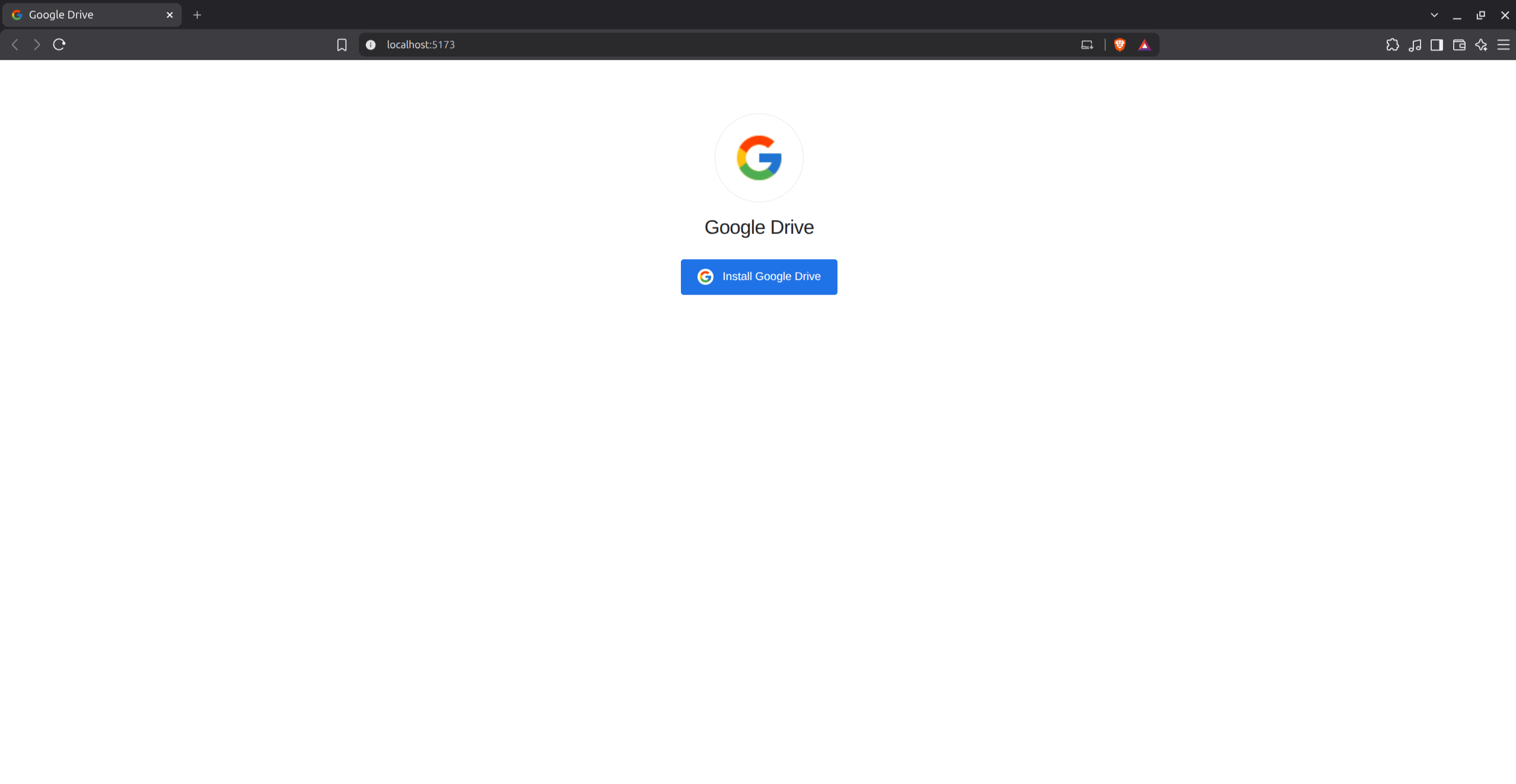
there is no password field. there is no fake accounts.google.com. the page only asks the browser to install a PWA.
2. the install prompt
this is the important dialog, and it is a real Chromium prompt, not HTML.
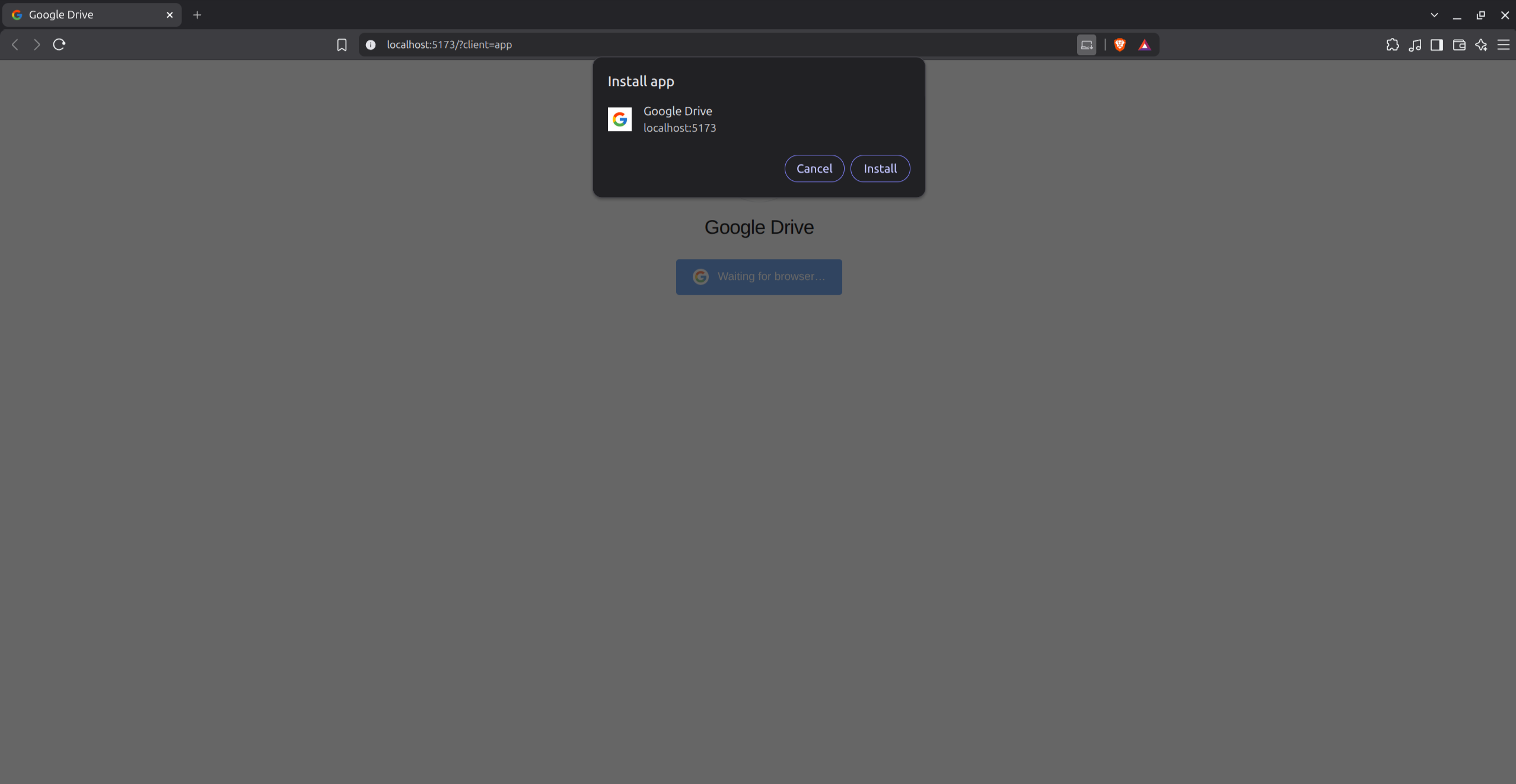
two things are attacker-controlled: the name (Google Drive) and the icon. one thing is not: the origin line. here it shows localhost:5173. in an engagement it shows whatever domain you registered. that line is the only honest origin cue left, and most people don’t read it.
this is the same surface mr.d0x used for “Install Microsoft Application”. I used Drive because it is a PWA people already know, and a shared-file pretext sits on it naturally.
3. the installed app
once installed, Chrome opens a standalone window. no tab strip, no address bar, taskbar icon is the Google mark. the page in that window is no longer “install”. it is “Sign in with Google”.
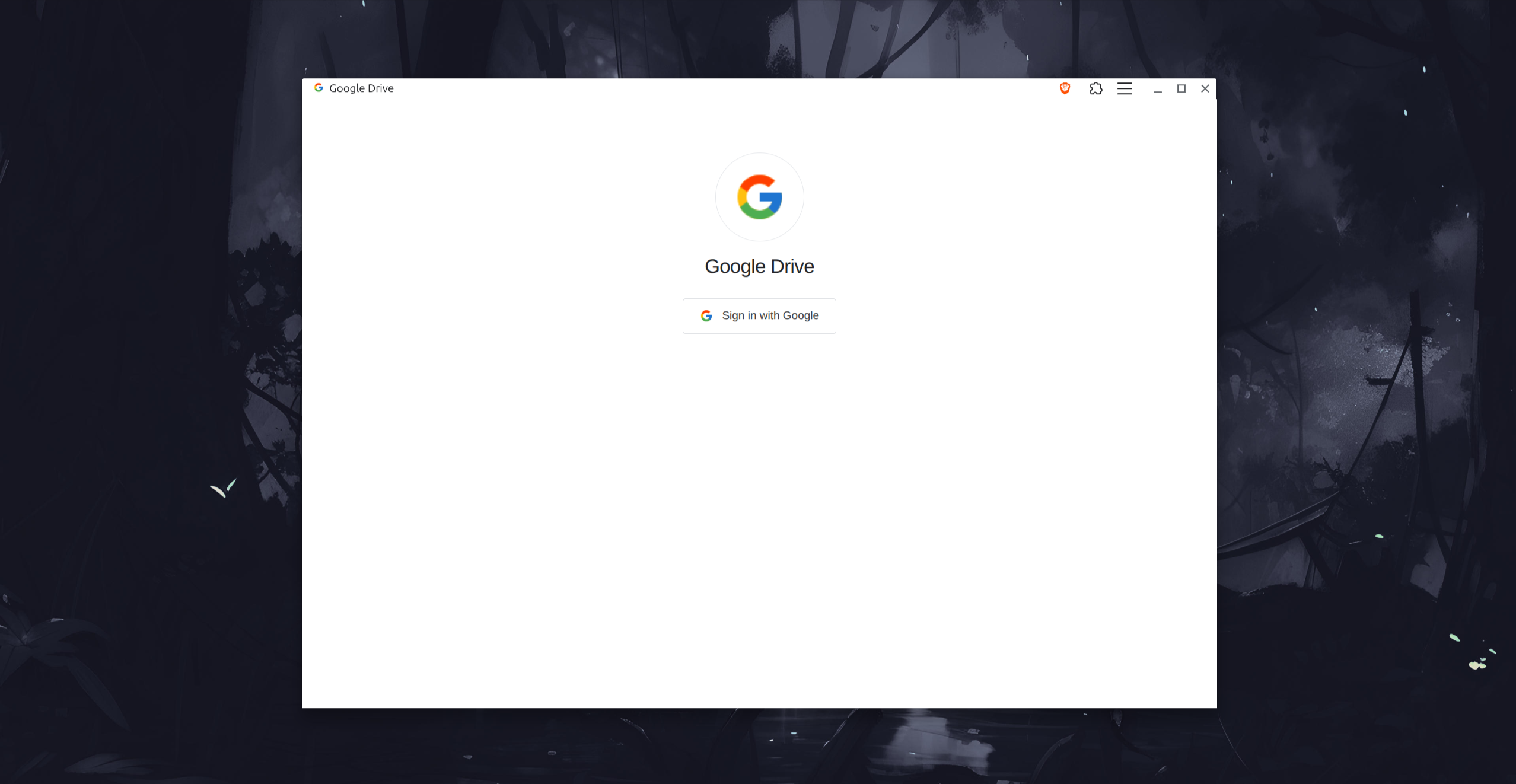
from here the user is in app-mode. origin is gone. the next click feels like every other installed Google client.
4. the real IdP
Sign in with Google is a top-level navigation to Google’s authorize endpoint. not an iframe, not a cloned form. the window title stays “Google Drive” because that is the PWA, but the document is https://accounts.google.com.
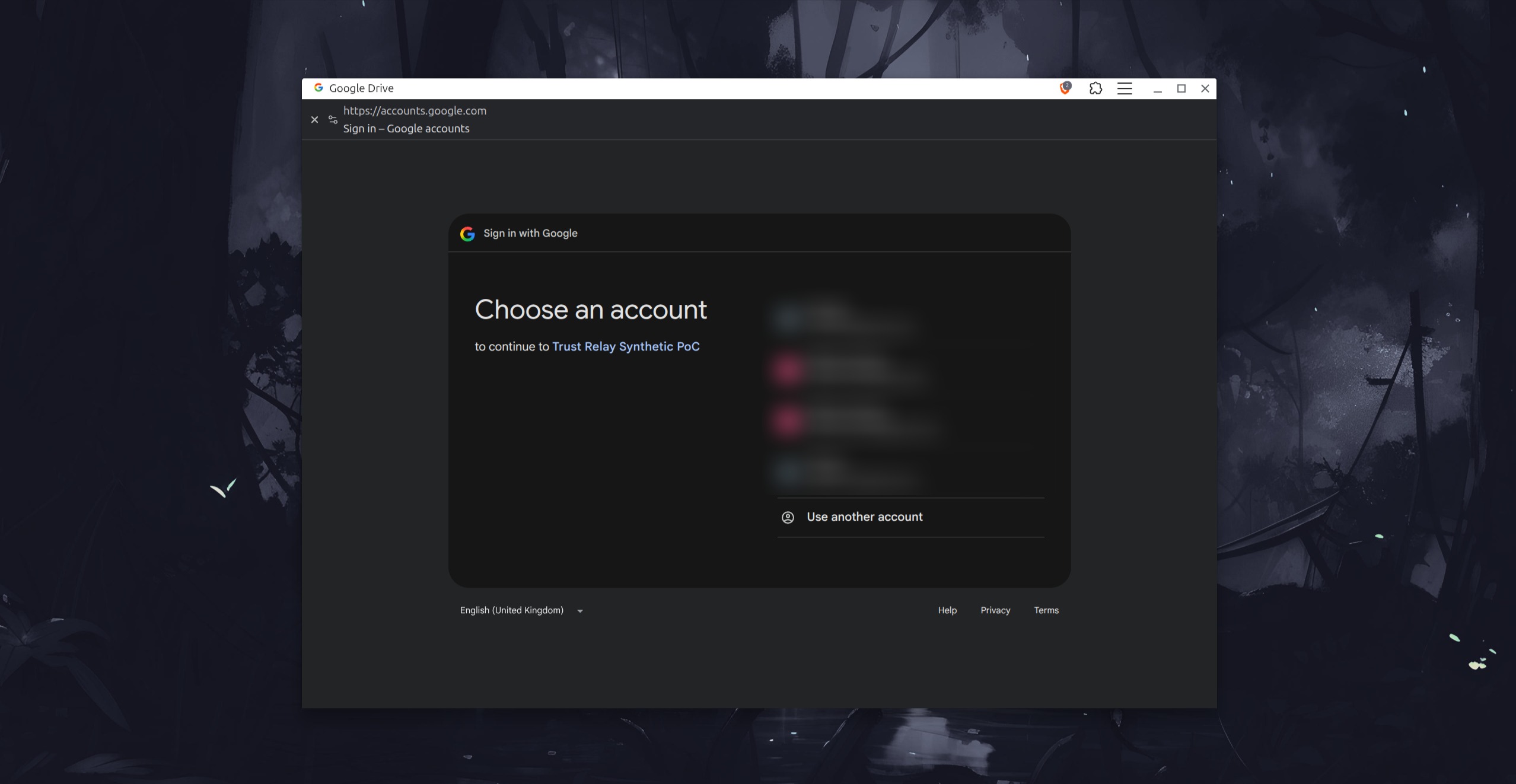
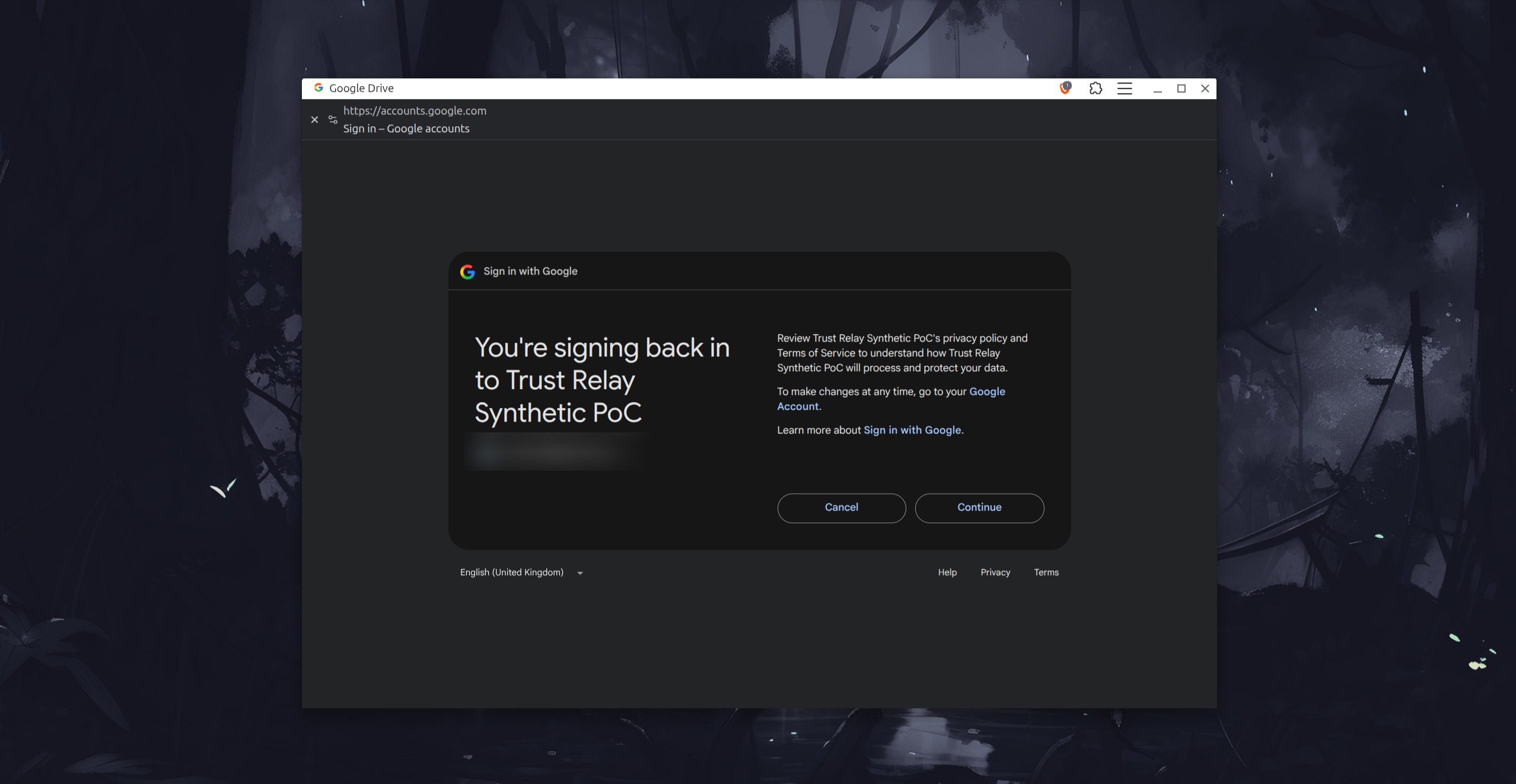
passwords, 2FA, passkeys, account chooser: all Google’s. filters looking for cloned Google HTML will not fire. training that says “check the URL on the sign-in page” can still pass, because the URL is real.
what they are consenting to is not Drive. it is the operator OAuth client. in the lab that client is named Trust Relay Synthetic PoC and it only asks for basic profile.
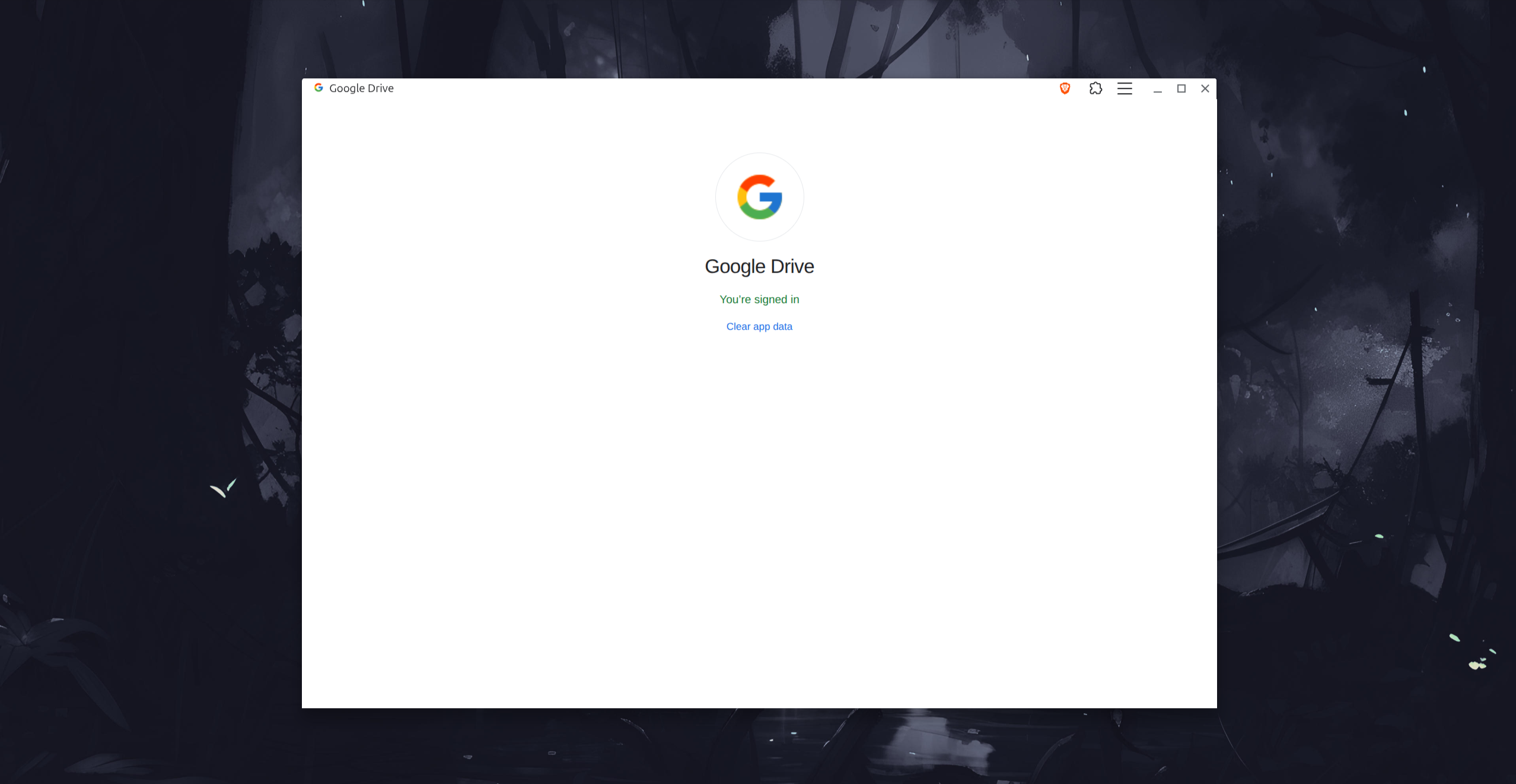
5. done
after consent the PWA comes back to itself. the PoC stops here.
Why this works
three trust cues, stacked:
- the browser install prompt — Chromium’s own UI. users have been trained that this is how you “get the app”.
- standalone chrome — no URL bar, vendor icon on the shelf. it looks like software, not a tab.
- the real IdP — TLS, Google’s pixels, Google’s MFA. the last doubt (“is this actually Google?”) gets answered yes.
classic OAuth consent phishing already uses (3). classic PWA phishing already uses (1) and (2), then throws a fake login. this technique is (1)+(2)+(3). the install is the commitment. the real authorize page is the closer.
for a red teamer, the useful output is a delegated grant to an app they registered, not a password hash. a spearphishing link gets them to the page, installing the PWA is user execution, and steal application access token is the analogue on the other side of consent.
this PoC does not keep the token. the grant is openid profile, used once, then thrown away. if a different OAuth application requested broader permissions, and the user or an admin actually approved them, its controller might theoretically be able to:
- read mail, files, contacts, calendars, or directory data
- send mail or modify resources if write scopes were approved
- perform actions as the consenting user within those delegated permissions
- retain longer-term access if offline access and a refresh token were granted
- affect multiple users if an administrator granted tenant-wide consent
it would not automatically provide the password, session cookies, MFA secrets, unrestricted account control, or permissions outside the approved scopes. admin approval, Conditional Access, token expiry, API authorization, and consent revocation still apply.
that list is the impact model for the technique, not a description of this lab. the PWA is only why the consent feels like signing into Drive. how far a grant goes is the scope list and whether tokens are kept.
How the PoC is wired
the participant side is intentionally small. a PWA manifest, a landing that calls beforeinstallprompt, a standalone view that starts authorization.
the name and icon in the install dialog come from the manifest, not from the button label:
{
  "name": "Google Drive",
  "short_name": "Drive",
  "start_url": "/app/?client=app",
  "display": "standalone",
  "icons": [
    { "src": "/icons/icon-192.png", "sizes": "192x192", "type": "image/png" },
    { "src": "/icons/icon-512.png", "sizes": "512x512", "type": "image/png" }
  ]
}
the server is a confidential OAuth client. the browser never sees the client secret, the PKCE verifier, or the access token. authorization code flow, PKCE S256, state, nonce, a browser-binding cookie, pinned issuer https://accounts.google.com, exact scopes openid profile, refresh tokens rejected. after Google returns the code, the server exchanges it, hits GET https://openidconnect.googleapis.com/v1/userinfo once, checks the sub, writes a normalized outcome, and drops the token.
that backend is hygiene for a lab I am willing to run against a test account. the technique does not depend on it. a red teamer who already has an OAuth client can swap the authorize URL and stop at consent.
one Chromium quirk worth knowing: the window Chrome opens immediately after Install often loads the current tab URL and does not report display-mode: standalone yet. reopening from chrome://apps does. I mark the installed launch with ?client=app on start_url so the first app window shows Sign in without a trip through the app centre.
the same pattern works for Entra. pin a tenant, request openid profile User.Read, prove with GET https://graph.microsoft.com/v1.0/me. I used Google for the screenshots because the install dialog is cleaner to show.
What I am not doing
I am not cloning accounts.google.com. I already wrote about proxying that flow with Evilginx. this is the opposite idea: let Google be Google.
I am not asking for Gmail, Drive files, or offline_access in this PoC. adding those is how this becomes a commodity consent kit, and it is also how Google’s unverified-app and admin-consent screens get louder. the interesting part is the trust handoff, not the scope list.
I am not hiding the origin in the install dialog. I can’t. if your target reads localhost:5173 or relay.yourdomain on that prompt, the install dies there. that is the right place for defenders to put a persistent origin cue.
Detection
the install dialog still leaks the real origin. after that, the useful signals are not “fake Google HTML”.
browser / endpoint
- a PWA named Google Drive (or whatever you branded) whose start URL is not
https://drive.google.com appinstalled/ standalone launch against an unapproved origin- Edge
WebAppSettings/WebAppInstallForceListinventory in managed estates - Chromium
chrome://appsand the shelf icon not matching a known publisher
identity
- a new OAuth client the org did not register, requesting
openid profileorUser.Read - user consent to an unverified app, especially right after a mail click
- Entra: service principal creation, user consent,
User.Readgrant - Google Workspace: new OAuth app, basic profile only, Testing / unverified publisher
correlation
the hunt is the chain, not any single event:
mail/chat click → first visit to operator origin → PWA install →
standalone launch → authorize request to accounts.google.com or
login.microsoftonline.com → consent → (optional) Graph / UserInfo
if your stack only looks for cloned login pages, this chain is invisible. if you join web proxy logs, browser management, and IdP audit, it is obvious.
gaps
managed PWA allowlists kill the install. admin-consent-required tenants kill the grant. passkeys do not kill this, they complete it, because the IdP is real. origin-cue training helps at step 2 and does almost nothing at step 3.
Conclusion
cloned logins fight the URL bar. this technique borrows two legitimate ceremonies instead: Chromium’s PWA install, then Google’s own authorize page.
for a red teamer it is an initial-access option when the goal is “will they install an unknown app and then trust the real IdP that follows”. for a defender it is a reason to inventory PWAs and new OAuth grants together, not separately.
next I want to run the same chain against Entra with a tenant-pinned client and see how much of the story survives admin consent. if the Google side taught me anything, it is that the install prompt is where the technique is honest, and everything after it is where people stop looking.
References
Technique inspiration
mr.d0x — Progressive Web Apps Phishing — Article · Repository
Main source for the installable-PWA trust transition, standalone window, app identity, and OS integration.
mr.d0x — Chromium Application Mode Phishing — Article
Informed the analysis of address-bar removal and application-like browser windows.
mr.d0x — Browser in the Browser — Article · Repository
Used as a comparison point. Trust Relay deliberately uses a genuine provider redirect instead of a simulated login window.
W3C Web App Manifest issue #747 — Security discussion
Covers counterfeit origin UI and trust ambiguity in standalone/fullscreen web applications.
Kaspersky — Phishing with Progressive Web Apps — Article
Independent discussion of install prompts, user-controlled app identity, OS integration, and absent address bars.
PWA implementation
- MDN: Trigger installation from your PWA
- MDN:
beforeinstallprompt - Web App Manifest specification
- vite-plugin-pwa documentation
These informed the manifest, service worker, genuine native installation prompt, standalone detection, and one-shot install-event handling.
OAuth/OIDC standards
- OAuth 2.0 — RFC 6749
- PKCE — RFC 7636
- OAuth 2.0 Security Best Current Practice — RFC 9700
- OpenID Connect Core 1.0
These informed Authorization Code Flow, PKCE S256, state, nonce, issuer/audience validation, exact redirects, and refresh-token rejection.
Google profile
These provided the pinned issuer, discovery metadata, authorization/token behavior, ID-token claims, immutable sub, and UserInfo endpoint.
Microsoft profile
- Microsoft identity platform OIDC
- Microsoft Graph: Get user
- Microsoft identity platform authorization-code flow
These informed the tenant-specific issuer, delegated User.Read permission, and fixed Graph /me proof.